How to give your content the context it needs
Written by Ryan Mills
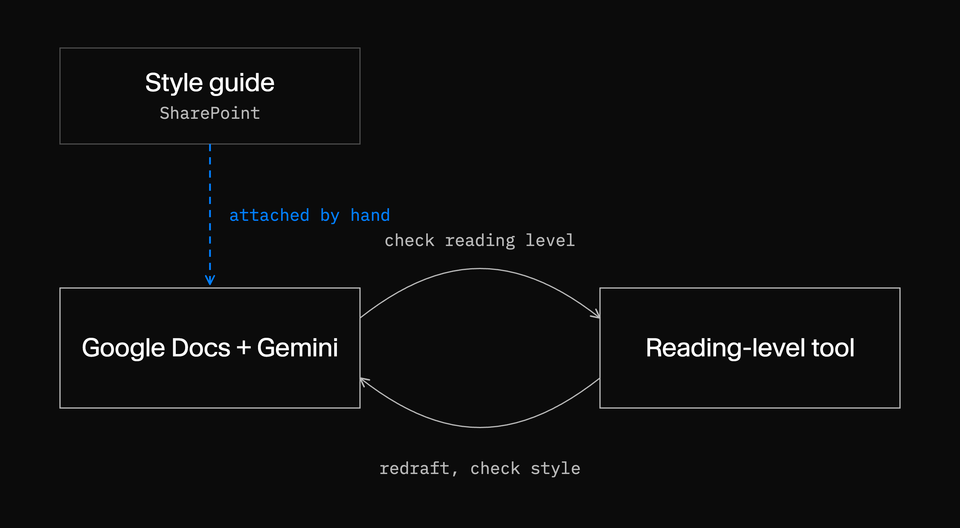
I recently ran a workshop with the content team at an education company that was onboarding onto Sanity. The content team wrote course materials in Google Docs with Gemini switched on. Their style guide lived in SharePoint, where Gemini couldn't reach it. So every conversation started the same way: someone downloaded the guide and attached it to the chat.
Once a first draft was done, it went through a third-party tool to produce versions at different reading levels. Those versions often drifted from the style guide, so the team pasted them back into Gemini and prompted again to bring them in line. Then they had to check Gemini's rewrite still matched the reading level, which meant another trip to the other tool. When I asked how often this happened, I was met with a collective *sigh*.
They were caught in a loop. Both AI tools did what they were asked, but neither knew what the other was working from. The team was spending more time, not less, getting to the right result.
That team wasn't doing anything wrong. They'd adopted AI the way most organizations do: inside the tools they already used, on top of the process they already had. I'd probably have done the same in their shoes. The assistant was capable enough. What it couldn't see was the knowledge that made the team's work theirs, and nothing connected one tool's output to the next.
Adoption and transformation are different projects
Starting with tools makes sense. Assistants in Google Workspace or Microsoft 365 are easy to try, and they help people summarize, draft, and prepare faster. Often, though, that exploration happens without a program behind it. Editors work it out for themselves, swapping prompts and sparring over what works, with little guidance from the organization on what good looks like. It's still a quick way to find out where AI could do more.
The trouble starts when rollout becomes the goal. Adoption puts AI inside existing tasks. Transformation changes what those tasks depend on: the knowledge AI can draw on, and the way work moves between people, agents, and systems. If that knowledge is scattered across documents, drives, and people's heads, AI inherits the scatter. It helps people move faster inside the old way of working, and sometimes, as in that workshop, slower.
What does our AI need to know about the business? Can it tell which guidance is current and approved? How should work pass between people and agents, and who decides when two tools disagree? Most adoption programs I've seen never get round to these questions, which is a shame, because that's where the interesting work is.
Content becomes context when it carries its conditions
It helps to separate two things. Content is what the organization writes: course units, policies, product pages, support articles, style guides. Context is what tells a person or an agent how to use that content: what it relates to, whether it can be trusted, and when it applies.
Compare two instructions an author might give an assistant:
- Write this at an accessible reading level.
- This unit is for learners aged 14 to 16. Use the reading level set in the current style guide, define subject terms on first use, and follow version 4 of the guidance, which replaced version 3 this term.
The first is an instruction. The second comes with the context an experienced author carries in their head without thinking about it. An AI tool only gets that if someone hands it over, which is exactly what that team was doing, by hand, in every conversation.
Most of this context is already written down somewhere. The style guide and the reading-level rules existed. But they lived as separate files in separate systems, with nothing connecting them to the work that depended on them.
Two gaps no prompt could close
Better prompting wouldn't have fixed either of these. They sit underneath the tools, not in them. Look closer at that workshop again and there are two separate problems.
The first is context. The style guide sat in SharePoint, where Gemini couldn't reach it, so it arrived as an attachment when someone remembered to add it. The reading-level tool had no access to it at all. Each tool worked from part of the picture.
The second is workflow. Reading-level versions were a step bolted on after drafting, outside the authoring tool. When style and reading level were pulled in different directions, there was no rule for which one wins and no stage where a person made that call. So the team made it over and over, one round trip at a time.
Better prompting wouldn't have fixed either of these. They sit underneath the tools, not in them.
Design work for people and agents from the start
Structured content answers one question: what should the AI know? It doesn't answer the other: how should the work get done?
Course materials might pass through authors, subject experts, an editorial lead, and accessibility review. Much of that process lives in comments, inboxes, and memory. Add an agent and you've added another participant without making anyone's ownership clearer.
Before adding agents, decide:
- Which steps belong to people, agents, or other systems
- Which decisions need a named person accountable for them
- Which checks can run automatically
- What happens when information is missing, out of date, or contradictory
- Where you can see what's waiting and what has already happened
Don't add agents to workflows designed only for people. Design for both from the start.
For course materials, an agent could check a draft against the style guide and flag where a reading-level version has drifted. A subject expert stays accountable for accuracy. Whoever owns the style guide settles the conflict between style and reading level once, in the guidance, rather than someone settling it in a chat window every afternoon.
Start with two maps
You don't need to restructure every document or automate every process. Pick one AI use case that matters, sit down with the team that does the work, and draw two maps.
The context map
Trace the path from request to published outcome:
- Which content and systems does it depend on?
- Which source is authoritative?
- What conditions change the answer?
- Who owns the information, and who approves changes?
- How will you know when it changes?
The workflow map
Trace the path from request to published outcome:
- What stages does the work pass through?
- Where do people, agents, and systems contribute?
- Which checks and decisions are required?
- What happens when a check fails?
- What record should remain afterward?
For that education team, the context map would have shown a style guide that reached the authoring tool only by attachment and never reached the reading-level tool. The workflow map would have shown a reading-level step with no rule for resolving conflicts. That's where the loop came from.
The maps also give content operations, product, and technology teams the same picture of the problem. That moves the conversation past tool access and into how knowledge and work are designed.
Where Sanity fits
Once you see the problem this way, the platform requirement follows. You need somewhere that connects structured content, the knowledge around it, and the process people and agents use to work with it. Sanity is the AI Content Operating System, and two capabilities announced at Everything *[NYC] 2026 map directly to the two maps: Knowledge Bases and Workflows.
Knowledge Bases
Knowledge Bases, part of Sanity Context, organizes selected material from Sanity datasets, websites, and files into topic entries that agents can retrieve.
For course materials, a team could build a focused Knowledge Base from the style guide, reading-level guidance, and approved course content. If two sources disagree, such as an old version of the guide and a new one, the build can present both claims and their sources as an issue for a person to resolve. Connected datasets and websites can be checked for changes, which creates issues to review before anything changes what agents see.
Knowledge Bases won't decide what the organization believes. Teams still choose trusted sources, resolve conflicts, and fix bad material. It's an opt-in beta, and its limits may change. What it gives an agent is a reviewed body of knowledge to work from, where before there was whatever someone remembered to attach.
Workflows
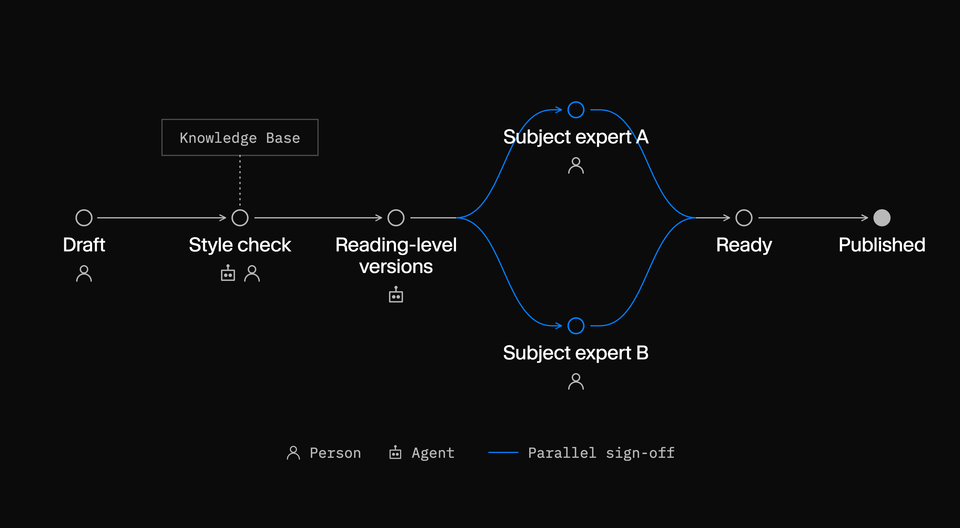
Workflows models a process alongside the content it governs, through stages, activities, conditions, actions, and effects. People and agents can move work forward, and the workflow's state and history stay available to inspect.
A course unit might move through:
Draft → Style check → Reading-level versions → Subject review (one or more experts, in parallel) → Ready → Published
The team defines what each stage requires. Subject review doesn't have to be one person in a queue. A unit that covers two subjects could go to two experts at once, each signing off on their part, and only move on when both have. The conflict between style and reading level gets resolved at a defined stage, by a defined person, with a record of the decision.
Workflows is in beta and early access. Teams still define and deploy the process, supply the integrations, and design enforcement around their real publishing paths. It makes the process visible and inspectable.
Start with what you keep attaching
Giving people an AI assistant is a reasonable first step. It builds confidence, and it shows where deeper change is needed, often faster than any audit would.
The next step requires humans to decide what AI should know, which sources it can trust, and how work moves between people and agents. That work happens before any agent writes a word.
If your team attaches the same document to an AI conversation every day, that document is context your systems can't see. Start your context map there.
Every attachment you retire is one less round trip, and one less decision left to whoever remembers.