How to ship a better platform: Put an editor and a developer in the same room
Written by Adam Gray, Katie Carrera
On a recent enterprise project, we sat with an editor while they built out real content in their Sanity Studio, the app their team would use to create and publish content. As they worked, we changed the schema, the code that defines the content model, on the call. When they brought up confusion at managing adjustments for different internal audiences, we turned reference arrays into checkboxes. When they described how announcements expire, we added scheduling and expiration fields.
That hour taught us more about how the team publishes than weeks of modeling meetings. The editor left more confident in the system because they already used it to do their job.
Sessions with a real-time, editor-to-developer feedback loop that rapidly refines the experience are often much more successful than projects that skip this step.
Most implementations that falter struggle because editors first open a Studio during user-acceptance testing, months into a project, and find fields that don’t make sense to them or gaps where their usual patterns should be. By then, every adjustment is expensive and there’s no trust between business and engineering teams to fix the problems.
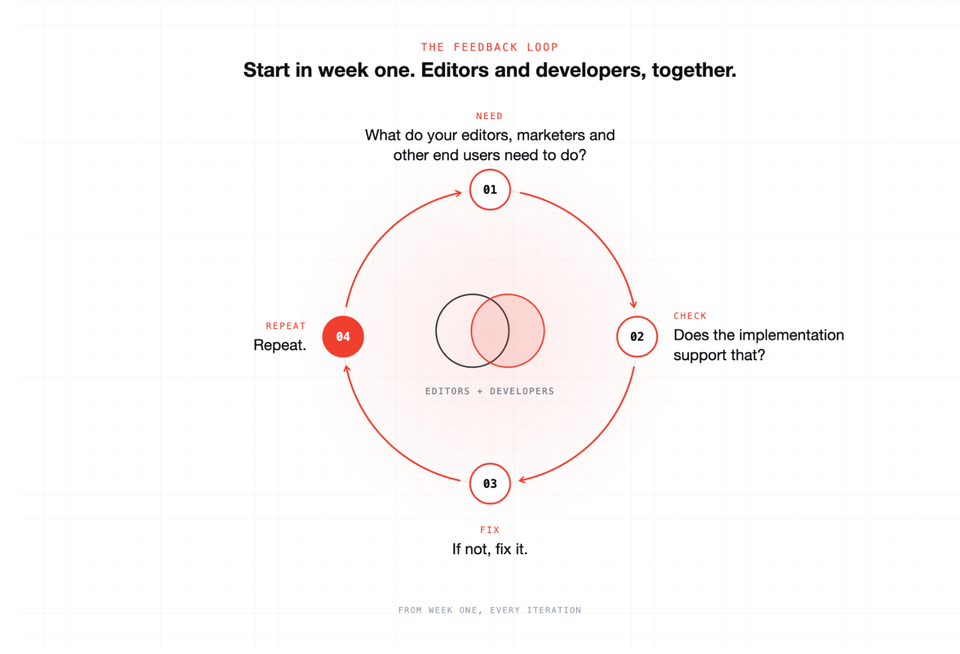
The alternative is a loop you can start in week one, with editors and developers working together:
- What do your editors, marketers, other end users need to do?
- Does the implementation support that?
- If not, fix it.
- Repeat.
When you follow this loop, requirements stop being a document one team hands to the other. Editors and developers keep working this way after the migration, improving the platform with each project.
1. Ask editors what they need to do
Teams that migrate gravitate toward rebuilding every content type and field from the old CMS. It’s what they know. But that approach holds years of workarounds and copying it over carries the problems they’re trying to fix straight into Sanity.
Start by having the editors list out the jobs they need do. This usually involves publishing marketing campaign elements, updating a product description, taking articles from draft to published, routing a press release through reviews.
Then ask them to walk you through last week's work with whatever tools they used, even if that was email and Word documents. As they share their workflow, ask questions about their objectives and frustrations. How would they improve the process tomorrow if given the opportunity? What old stop-gap became “the system” that they’d love to remove?
Write each task down and agree which ones the first version of the platform has to support. Keep the list where the whole team can see it. Developers and project managers will use it later as a backlog.
2. Keep it simple when building a Studio
If an editor doesn't need a certain field, skip it. Don’t use 30 fields to do what eight can. Every custom input built for a hypothetical edge case is code your team maintains for years. So cut hard on the first pass. Use the standard input until an editor shows you where it fails them. Flatten nested objects that confuse the person building the page.
Apply the same keep-it-simple test to organizing the navigation editors see when they open Sanity Studio or another app. Group content and information by task and audience, hide content types only admins create, and put work that frequently needs attention at the top.
Additional features, structure, and help text can be layered in based on feedback editors provide as they test the experience.
3. Have developers fix gaps while the editor is watching
Get a working Studio in front of an editor as early as you can (we mean days not months) and seed it with real example content from your company. Then have the developer sit with the editor while they make something they'd actually publish, watch where they hesitate, and discuss how to make the experience better.
Change the schema while the editor is still on the call, or follow up with the adjustments as quickly as possible. AI-assisted development enables real-time iteration.
Don’t skip past these joint working sessions. Putting editors and engineers in a room together is where the magic happens.
Project managers and project leads should book a recurring editor session, say 30 or 60 minutes a week to start, and protect it like a sprint review. Then use the editor task list as your backlog and your acceptance criteria.
4. Repeat the cycle, and automate last
Teams like to jump to custom workflows and approval chains wired for every role. Wait. If editors haven't published the core document types by hand yet, you don't know which process you're automating, and you'll encode the wrong one. Run the manual path through several real editing cycles, then automate the steps that are still painful.
Governance follows the same rule. Permissions, review stages, and blocked-word checks are much easier to get right once your teams have the outlines of who publishes what, where, and how often.
Why this approach works
The biggest indicator of success is whether end-users and engineers on both sides of the implementation are working together to make progress or talking past each other.
Embracing this type of loop quickly at the start of a new project means:
- Avoiding analysis paralysis: Content modeling is an important first step of any Sanity implementation, but getting bogged down in the theoretical can create rabbit holes and diversions about edge cases. Focus on the 80% use cases first.
- Demystifying the new system: We’re all hardwired to resist change. If editors are in Sanity and have a direct hand in making it work for their day-to-day, it’s a lot less intimidating. Same goes for engineers; if they see how fast they can make changes or tailor schema in early stages they’re more familiar with possibilities later.
- Connecting your teams: You’ve probably heard or experienced that editors and developers rarely talk to each other unless one is blocking the others’ work. Bringing the two groups together to build a new system, and showing how editors sharing their goals and problems can help developers identify the right tool in code creates a whole new dynamic. The sooner they’re working together, the better.
Try it on one task
Pick one task this week, and put an editor and engineer together to talk through it. Build the smallest Studio that supports it, put it in front of that editor, and fix what problems they run into. Then do it again next week.
By launch, your editors won't be opening the platform for the first time. They'll have helped build it.