Better context, better matches: An AI love story (for dogs)
Written by Ken Jones
Every dog shelter website has the same filters. Size, breed, age. They work, but they don't work the way you actually think about getting a dog.
You don't search for "medium, 2-4 years, terrier mix." You think: "I need a dog that won't terrorize my neighbor's cats and doesn't make me sneeze." That's a vibe, not a filter. Traditional search can't handle it.
So I built Pup Finder: a Next.js app that replaces rigid filters with a single text input where you describe your perfect dog in plain language. AI does the matching, using real structured data from Sanity to find dogs that actually fit.
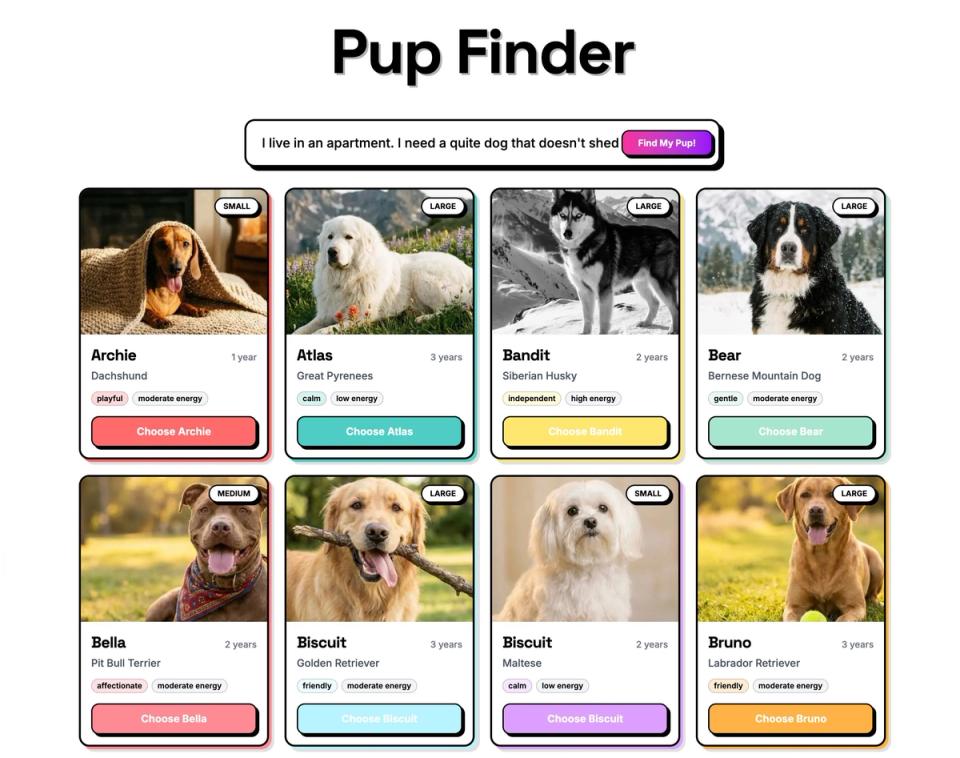
The whole thing took under an hour. Well, the functional app did. Then I spent another hour nudging pixels because I'm like that.
In this post I'll walk through how I built it, explain why Agent Context is a better fit for structured data than standard RAG, and show you how the AI matching actually works under the hood. The full source code is available at the end.
Why this matters beyond dog adoption
Before we get into the build, let's zoom out. This isn't really about dogs (even though dogs are the best demo subject and I'll die on that hill).
Think about any site with a catalog of things people need to filter through: real estate listings, e-commerce products, insurance plans, podcast episodes, job postings. Traditional filters force users to think in database terms: dropdowns, checkboxes, price ranges. That's not how people actually describe what they want.
Agent Context lets you put AI in front of your Sanity content so users can search the way they naturally think. The AI reads your schema, understands the relationships between fields, and queries your content intelligently. With embeddings enabled, it also supports semantic search — meaning queries can combine real constraints (size == "small") with meaning-based matching (text::semanticSimilarity) in a single GROQ call. Your structured data does the heavy lifting. AI just makes it conversational.
What I used
Here's my setup. Yours doesn't need to match. Pick the tools you're comfortable with.
- An LLM API key (I used Anthropic, but Agent Context works with any LLM provider)
- Next.js (App Router) and pnpm
- A photogenic dog (for testing purposes)
I used Claude Code for the build walkthrough below. The same approach works with Cursor, v0, Lovable, or any AI coding tool that supports MCP and skills.
The tools
Three Sanity AI tools made this come together:
Agent Skills for better code output
Agent Skills are modular instruction sets that teach AI agents Sanity-specific best practices. I installed two: the Agent Toolkit (general Sanity development patterns) and the Agent Context skill (for building agents that query Sanity content). Without these, the coding agent would be guessing at conventions. With them, it reads Sanity's own docs and applies the right patterns from the start.
Sanity MCP server for rapid prototyping
Sanity MCP server connects AI coding agents (Claude Code, Cursor, v0, etc.) to your Sanity workspace. During development, it helped scaffold the schema, generate sample dogs with matching AI-generated images, and wire everything up. If you've used an AI coding tool with Sanity before, you've probably already set this up.
Agent Context for the end-user experience
Agent Context is the star of the show, and it's worth pausing on why.
Most AI-powered search follows the RAG (Retrieval-Augmented Generation) playbook: dump your content into a vector database as flat text, then do similarity search. That's fine when you're matching a question to a help article. But it falls apart when your data has real structure.
Dog adoption data isn't a blog post. A dog has a temperament field set to "calm", a goodWithCats boolean, a hypoallergenic flag, an energyLevel, a size. These are discrete, queryable facts, not paragraphs to fuzzy-match against.
Agent Context gets this. It's a hosted MCP (Model Context Protocol) server that gives your AI agents read-only, schema-aware access to your Sanity dataset. The agent doesn't get a blob of text. It gets your schema, understands every field and relationship, and writes its own GROQ queries to find content that matches real constraints.
This is where it gets interesting. A user doesn't type hypoallergenic == true. They type "I'm allergic to dogs." A user doesn't type size == "small" && energyLevel == "low". They type "I live in a tiny apartment." The AI bridges that gap. It understands that allergies map to the hypoallergenic field, that a tiny apartment means you probably shouldn't adopt a high-energy Great Dane, and writes precise queries against your structured data. Combine that with semantic search through Sanity's embeddings, and you get agents that understand meaning and obey real constraints. The best of both worlds: semantic matching where it helps, structured queries where it matters.
You configure it all in Studio (which document types are visible, instructions for the AI, GROQ filters to scope access) and your content's structure does the rest.
How I built it
Step 1: Install the Sanity MCP server
If you haven't already, set up the Sanity MCP server in your AI coding tool of choice. This connects your agent to your Sanity workspace so it can scaffold schemas, create content, and generate images during development.
Internal server error